> For the complete documentation index, see [llms.txt](https://docs.responso.com/responso-doc/llms.txt). Markdown versions of documentation pages are available by appending `.md` to page URLs; this page is available as [Markdown](https://docs.responso.com/responso-doc/br/configuracao/tags.md).
# Tags
As tags no Responso permitem categorizar e organizar suas mensagens. Com as tags, podemos filtrar de forma fácil e rápida apenas as mensagens específicas de nosso interesse.
É possível usar etiquetas para marcar mensagens, por exemplo, um departamento específico ou um tipo de mensagem. Não há limite para a quantidade de etiquetas que podem ser adicionadas no sistema Responso.
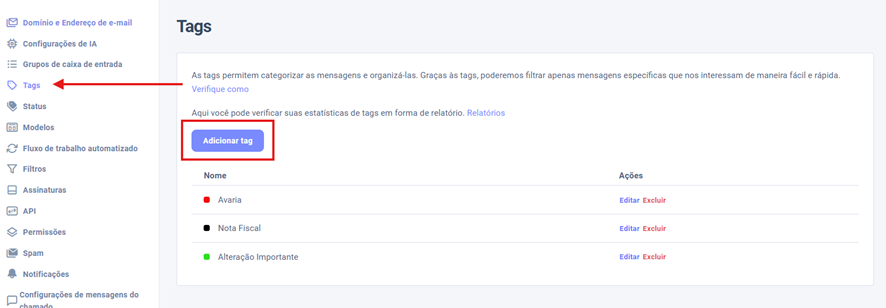
Para criar uma Tag, basta clicar em Configurações, depois em Tags e no botão Adicionar Tag.
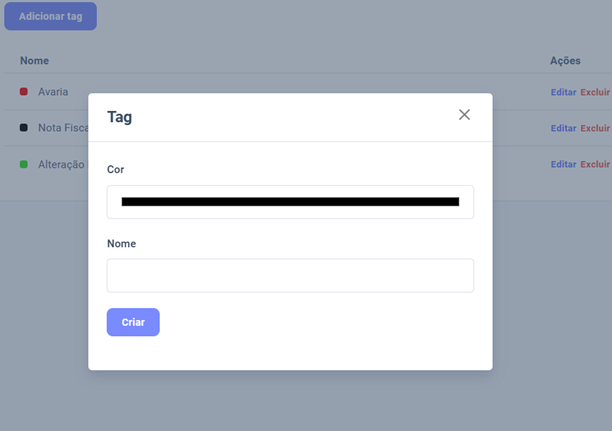
Poderá escolher o nome e a cor da Tag.
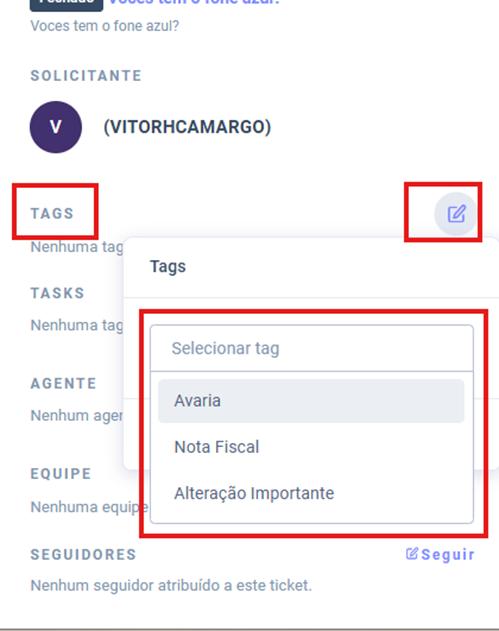
Depois de criadas, você pode atribuir as Tags dentro dos tickets na parte inferior direita, na seção de Tag.
A Tag aparecerá também na Lista de Tickets, na Caixa de Entrada.