> For the complete documentation index, see [llms.txt](https://docs.responso.com/responso-doc/llms.txt). Markdown versions of documentation pages are available by appending `.md` to page URLs; this page is available as [Markdown](https://docs.responso.com/responso-doc/br/configuracao/email-via-imap/somente-via-imap.md).

# Somente via IMAP

Para integrar perfeitamente qualquer caixa de entrada de e-mail com o sistema Responso, é recomendável usar **a integração de e-mail via IMAP/SMTP,** que permite preservar o histórico de seus emails. As instruções abaixo descrevem os passos necessários para iniciar a integração com sucesso.

### Adicionando integração IMAP/SMTP

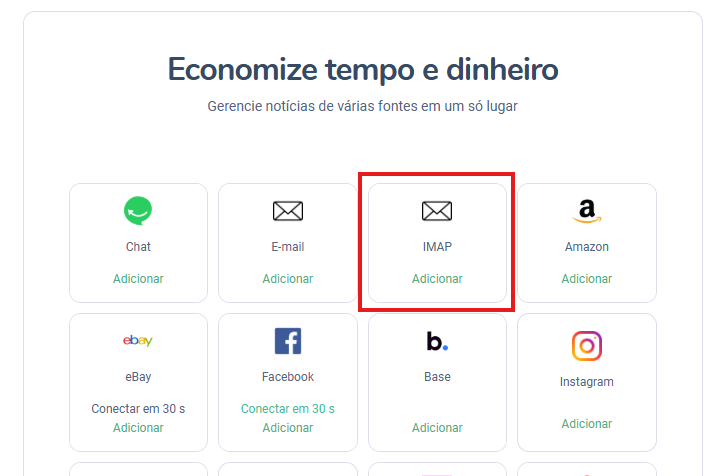
1. Clique no botão ***Adicionar Canal*** e selecione a integração **IMAP** na lista

<figure><img src="/files/rwdKmx3nYN83eGougiSV" alt="" width="543"><figcaption></figcaption></figure>

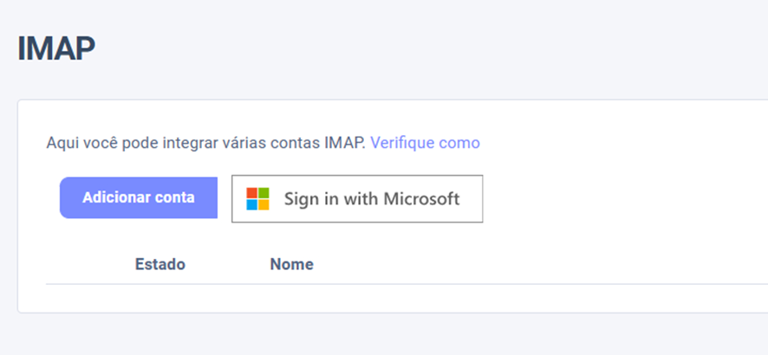
2. Na tela que aparecer, clique no botão ***Adicionar conta***

<figure><img src="/files/wlNzBhWW0IQIxXQamQ8E" alt="" width="563"><figcaption></figcaption></figure>

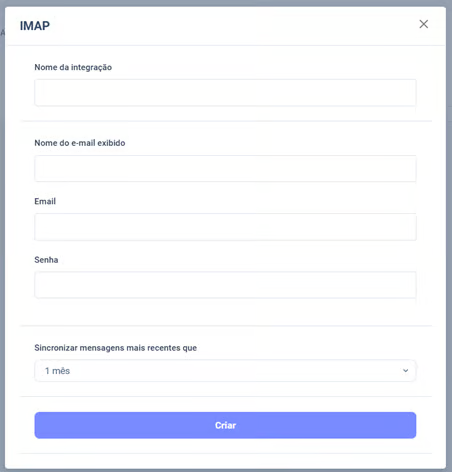
3. Preencha os campos. No campo de senha, **insira a senha do seu e-mail -** a menos que você use Gmail, Yahoo ou Outlook. Neste caso, precisará criar uma senha para o aplicativo Responso. Veja como fazer isso [aqui](https://docs.responso.com/responso-doc/integracje/email/imap/integracja-email-za-pomoca-imap-smtp#utworzenie-hasla-dla-aplikacji)

<figure><img src="/files/MBSBkmgdcB3KT0C3lOlT" alt="" width="339"><figcaption></figcaption></figure>

4.Na lista suspensa, selecione o intervalo de tempo apropriado para a sincronização. Sincronizar significa, entre outras coisas, mesclar corretamente as conversas na sua caixa de entrada com as mensagens gerenciadas pelo Responso. Não significa importar mensagens retroativamente para o Responso.

5.Clique em *Criar* . Sua integração foi adicionada

---

# Agent Instructions
This documentation is published with GitBook. GitBook is the documentation platform designed so that both humans and AI agents can read, navigate, and reason over technical content effectively. Learn more at gitbook.com.

## Querying This Documentation
If you need additional information that is not directly available in this page, you can query the documentation dynamically by asking a question.

Perform an HTTP GET request on the current page URL with the `ask` query parameter, and the optional `goal` query parameter:

```
GET https://docs.responso.com/responso-doc/br/configuracao/email-via-imap/somente-via-imap.md?ask=<question>&goal=<endgoal>
```

`ask` is the immediate question: it should be specific, self-contained, and written in natural language.
`goal` is optional and describes the broader end goal you are ultimately trying to accomplish on behalf of the user. GitBook uses it to tailor the answer towards what is most useful for that goal.

The response will contain a direct answer to the question and relevant excerpts and sources from the documentation.

Use this mechanism when the answer is not explicitly present in the current page, you need clarification or additional context, or you want to retrieve related documentation sections.